


What are Intel NUC and compact PC systems used for?
Published date: 30 March 2026
Introduction
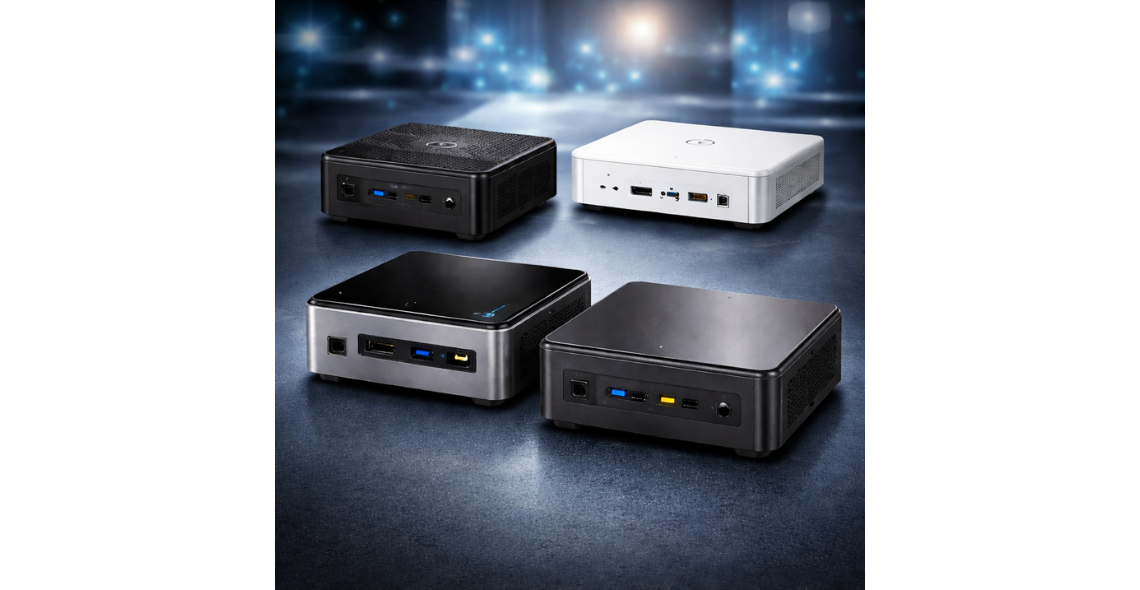
Intel NUC and other compact PC systems have changed expectations of what a business computer can look like. Instead of a tower under a desk, these machines pack core PC capabilities into a small chassis that can be mounted behind a display, tucked into a cabinet, or deployed in large numbers without dominating floor space. They are often chosen when you need a reliable Windows or Linux endpoint with better flexibility than a thin client but a smaller footprint and lower power draw than a traditional desktop.
An Intel NUC (Next Unit of Computing) is a category-defining compact PC format: a small, typically square system designed for easy deployment and upgrade in some configurations. “Compact PC” is broader and includes NUC-style devices from multiple vendors, small form factor desktops, and ultra-small PCs designed for embedded or industrial use. The key idea is consistent: a full PC platform, just miniaturised.
These systems are not automatically “low power” or “low performance”. Many run modern processors, support fast SSD storage, and can drive multiple displays. The trade-offs are usually around expansion and thermals rather than capability. Understanding where compact PCs fit, and where they do not, helps you specify the right device for office work, signage, kiosks, edge computing, networking tasks, and specialist environments where space, energy use, and manageability matter.
What Intel NUC and compact PC systems are (and how they differ from desktops, mini-ITX and thin clients)
Intel NUC originally referred to a specific compact PC platform with a small motherboard and chassis, designed to deliver mainstream PC features in a very small enclosure. Many models are roughly the size of a paperback book, with external power supplies, multiple USB ports, at least one video output, wired networking, and Wi‑Fi/Bluetooth on many configurations. Depending on generation, they may offer upgradeable memory and storage, typically via SO‑DIMM slots for RAM and M.2 slots for SSDs. Some variants also support 2.5-inch SATA drives, giving extra flexibility for capacity.
Compact PC systems include NUC-style devices and other small form factor machines that follow similar principles. They are chosen for high-density deployment, mounting options (such as VESA mounts behind monitors), and predictable platform features in a low-profile unit. Some compact PCs are designed for fanless operation or rugged installations, which can be important in dusty or vibration-prone areas.
Compared with traditional desktops, compact PCs usually offer fewer internal expansion options. A tower can accept multiple add-in cards, several drives, and larger cooling solutions. A compact unit tends to prioritise integrated graphics, limited storage bays, and smaller cooling capacity. For most productivity tasks this is not a problem, but it can matter for specialist GPU needs or multi-drive storage configurations.
Mini‑ITX is not a product but a motherboard form factor used in small custom builds. A mini‑ITX build can be very powerful and flexible, but it typically requires more assembly, component compatibility checking, and ongoing support planning. Compact PCs are usually bought as complete validated systems, which can simplify rollout and support.
Thin clients are different again. They are designed primarily to connect to virtual desktops or remote application sessions. They tend to be tightly locked down and sometimes less capable for local processing, storage, and peripheral support. Compact PCs are full PCs, so they can run local applications, handle local storage securely, and support a wider variety of devices, which is useful when network conditions vary or when certain applications must run on-site.
Common use cases in business environments (office productivity, digital signage, meeting rooms, kiosks and POS)
In office environments, compact PCs are often deployed as space-saving endpoints for productivity. They can be mounted behind a monitor to reduce desk clutter, or placed in shared work areas where a full tower would be intrusive. For typical workloads such as email, web apps, document editing, video calls, and line-of-business software, a compact PC with a modern processor, adequate memory, and a fast SSD feels responsive and is easier to accommodate in tight spaces.
Digital signage is another common fit. Compact PCs can drive one or more displays, run scheduling software, and store local content for resilience if the network is intermittent. Many signage deployments benefit from small, hidden devices that can be secured behind screens. Key considerations here include support for the required resolution and refresh rate, the number of displays, and whether the system can recover automatically after power interruptions. For retail and hospitality sites, central management and predictable behaviour after updates can be as important as raw performance.
Meeting rooms and collaboration spaces frequently use compact PCs as dedicated conferencing engines. They can be paired with USB audio devices, cameras, and touch controllers while remaining out of sight. A small PC can also serve as a room booking panel driver or as a wireless presentation receiver host. In these settings, quiet operation and reliable wake behaviour matter because users expect the room to work immediately without troubleshooting.
Kiosks and self-service terminals benefit from the same qualities: compactness, mountability, and enough computing power to run a browser-based or native application smoothly. A compact PC also allows more flexibility than a thin client if the kiosk needs local device drivers, local caching, or offline operation. For POS environments, compact PCs are used when you need multiple peripheral connections, stable performance, and a predictable OS image. Ports matter here: enough USB for scanners and printers, serial support if legacy devices are involved, and wired networking for consistency.
Across these business deployments, the operational win is often standardisation. Choosing a small set of compact PC models makes imaging, spares, and support easier, especially when you may be deploying across multiple sites and need consistent behaviour and driver availability.
Common use cases in technical and specialist settings (edge computing, light servers, networking, development labs and industrial control)
Beyond office roles, compact PCs are increasingly used at the edge, where data is generated and needs to be processed locally. Examples include analysing sensor data, running local databases for quick lookups, or filtering and forwarding telemetry to central systems. Compact PCs can host containerised workloads, lightweight analytics, and local message brokers, reducing latency and dependence on constant connectivity. The small footprint enables them to be installed in cabinets, wall enclosures, or near equipment where a full server would be impractical.
They are also used as light servers for specific tasks. While they are not replacements for enterprise rack servers, a compact PC can run services such as DNS, DHCP for isolated networks, small application servers, monitoring agents, or license servers in controlled environments. The limitations are usually around redundant power, hot-swap storage, and remote management features. For small teams or labs, these trade-offs are acceptable when the workload is modest and the priority is low noise and low power.
Networking and security use cases include running software-defined routing, firewall appliances, VPN endpoints, or network monitoring tools. Some compact PCs offer multiple network ports or can be selected specifically for that feature, which can simplify deployment. Even when only one port is present, USB or Thunderbolt networking adapters may be used, though you should validate driver stability and performance if the network function is mission-critical.
Development labs often rely on compact PCs as disposable or dedicated build agents, test benches, and platform validation nodes. Their repeatable hardware configurations make them useful for reproducing issues and maintaining consistent test environments. They are also practical for “lab-in-a-box” setups, where the compute node can sit beside specialised equipment without taking over the workspace.
Industrial control and operational technology settings can use compact PCs as HMI stations, protocol gateways, or local control interfaces. In these scenarios, durability, long-term availability, and stable driver support can matter more than peak performance. If the unit will be installed near machinery, consider fanless or filtered designs and verify operating temperature ranges. For deployments, it is also important to consider compliance, safety requirements, and the ability to lock down the system to reduce unplanned changes that could affect operations.
Key considerations before choosing a compact PC (performance, storage, memory, connectivity, power, thermals, manageability and compliance)
Performance should be defined by the workload rather than by assumptions about size. For office productivity and signage, mid-range processors are often sufficient. For edge workloads, software builds, or heavy browser-based applications, additional CPU cores and sustained performance become more important. Compact PCs can throttle under prolonged load if cooling is constrained, so it is worth considering sustained performance, not just peak boost specifications.
Storage choice has a direct impact on responsiveness and reliability. NVMe SSDs are common and provide fast boot and application load times. Capacity planning matters because compact PCs often have fewer drive bays. If the workload involves local content libraries, logging, or caching, choose enough capacity and consider endurance ratings for write-heavy use. Where data sensitivity is a concern, hardware-based encryption support and secure erase features should be evaluated, along with backup or replication strategy.
Memory is another frequent constraint. Many compact PCs use laptop-class SO‑DIMMs and may have a maximum supported capacity. For modern operating systems and multitasking, more memory reduces slowdowns, especially for conferencing, multiple displays, and browser-heavy workflows. For virtualisation or containers, memory headroom becomes essential.
Connectivity must be matched to the environment. Check the number and type of USB ports, video outputs, audio requirements, and whether you need legacy ports. For multi-display signage or trading-style setups, verify how many displays are supported at the required resolution. Wired networking is usually preferred for stability, but Wi‑Fi quality and antenna design can be important where cabling is difficult. Consider Bluetooth only if it is required, as it can introduce pairing and policy overhead.
Power and thermals affect placement. Fanless systems reduce noise and dust intake but may have lower sustained performance. Fan-cooled models can deliver more performance but need clean airflow. In tight enclosures, pay attention to intake and exhaust paths. Also consider power behaviour: BIOS options for auto power-on, scheduled wake, and recovery after power loss are useful for signage and kiosks.
Manageability includes imaging, driver lifecycle, BIOS control, and remote support capabilities. For fleet deployments across sites, look for stable platform availability, consistent component sourcing where possible, and tools that support unattended updates and remote diagnostics. Compliance considerations include secure boot, TPM availability, device lock options, and alignment with internal security policies. If the device will be customer-facing, physical security such as lock slots, hidden mounting, and BIOS passwords can be as important as software controls.
FAQs
What is the difference between an Intel NUC and a generic mini PC?
An Intel NUC is a well-known compact PC design that historically followed a consistent platform approach, with specific chassis sizes, motherboard layouts, and a focus on delivering a full PC experience in a small unit. A generic mini PC is a broader category that may resemble a NUC in size but can vary significantly in build quality, component selection, cooling design, and long-term driver support. For business use the practical difference often comes down to predictability and lifecycle. A well-specified compact PC should have clear documentation for memory and storage support, stable firmware updates, and a track record of compatibility with your operating system and management tools. When comparing devices, focus on what you can verify: supported RAM capacity, SSD type and size, port selection, display support, warranty terms, and the vendor’s approach to firmware and security updates.
Are compact PCs powerful enough to replace a desktop for everyday work?
For many users, yes. Everyday work typically includes email, web applications, office suites, collaboration tools, and line-of-business software. A compact PC with a modern mid-range processor, 16GB of memory, and an NVMe SSD can deliver a desktop-like experience while using less space and often less power. The cases where a traditional desktop still has a clear advantage are workloads that need sustained high performance, large internal expansion, or specialised GPUs. Examples include heavy content creation, large-scale data analysis, some CAD workflows, and tasks that benefit from multiple internal drives. Another factor is upgrade flexibility: a tower can often be expanded more over time. For most standard roles across offices, compact PCs can be standardised successfully if you size the CPU, memory, and storage to the heaviest common workload rather than the average.
Can compact PCs be used for digital signage and stay reliable long-term?
They can, provided they are specified and configured for signage realities. Reliability depends on stable power, appropriate cooling, robust storage, and predictable software management. For signage, confirm the device can drive the required number of displays at the right resolution and that it supports the chosen mounting method. Storage should be sized for content, and SSD endurance matters if the system writes logs or caches frequently. Configure the BIOS and operating system to recover after power interruptions, and consider watchdog or auto-restart settings where available. Thermals are important because signage PCs are often installed behind screens or inside enclosures with limited airflow. Choose a system that can operate within the expected temperature range and avoid placing vents against surfaces. For multi-site deployments, standardised images, controlled update rings, and remote monitoring reduce downtime and support effort.
What should I prioritise when choosing storage and memory for a compact PC?
Prioritise enough memory to avoid swapping, and fast, reliable SSD storage that fits both capacity and endurance needs. Memory shortages cause slowdowns that users notice immediately, especially with modern browsers, conferencing tools, and multi-monitor setups. For many business roles, 16GB is a practical baseline, while heavier multitasking, development, or local virtualisation may require 32GB or more, depending on platform limits. For storage, NVMe SSDs provide strong responsiveness and are usually the best choice for OS and applications. Capacity planning should include headroom for updates, temporary files, and local data. If the workload is write-heavy, look for SSDs with suitable endurance ratings and power-loss protection features where appropriate. Also consider security requirements such as hardware encryption support and the ability to securely wipe drives. In deployments, standardising on a few tested RAM and SSD options can simplify procurement and troubleshooting.
Are compact PCs suitable for edge computing and small server tasks?
They can be a good fit for edge computing and certain small server roles, especially when space, noise, and power draw are constrained. Compact PCs are often used to run container platforms, local databases, data collection agents, and protocol gateways close to where data is generated. For light server tasks such as monitoring, small web services, or local automation, they can perform well if you plan for storage capacity, memory, and sustained CPU load. However, they are not designed like enterprise servers. They typically lack redundant power supplies, hot-swap drive bays, and some advanced remote management features. If the service is business-critical, you may need redundancy at the application level, a failover device, or a clear replacement process. For site deployments, consider physical access constraints and how you will patch, monitor, and recover the unit remotely.
How do I ensure a compact PC is secure and manageable in a business fleet?
Start with platform features that support security and controlled administration. Look for TPM support, secure boot capability, BIOS password controls, and the ability to disable unused ports if your policy requires it. Use full-disk encryption where appropriate and define a standard build process with consistent drivers and firmware versions. Manageability improves when you can automate patching, inventory, and remote troubleshooting, so ensure the device is compatible with your chosen endpoint management tools. For kiosk and signage roles, consider restricted user modes, application whitelisting, and automatic login configurations that still preserve secure update practices. Physical security also matters: mount devices out of easy reach, use lock slots where available, and control access to BIOS and boot options to reduce tampering risk. For organisations with multiple sites, a clear lifecycle plan for updates and spares helps maintain security without increasing downtime.
Conclusion
Intel NUC and compact PC systems are used wherever organisations need a full PC in a smaller, more deployable package. In business environments, they commonly power office productivity setups, digital signage players, meeting room systems, kiosks, and POS terminals. In technical and specialist settings, they can serve as edge computing nodes, light servers for targeted services, networking and security appliances, development lab machines, and control interfaces where space, power, and practicality shape the design.
Choosing the right compact PC is less about the smallest box and more about matching real-world requirements. Performance must be assessed under sustained load, not just headline specifications. Storage and memory should be sized for the busiest users and the most demanding scenarios, with attention to SSD endurance and platform limits. Connectivity, display support, power behaviour, thermals, and manageability features are often the difference between a smooth rollout and an ongoing support burden. Compliance and security controls, both software and physical, help ensure compact deployments remain dependable across sites.
If you are planning a compact PC rollout or refreshing existing endpoints, review your workload needs and component choices carefully, then explore compatible storage and memory options with Origin Storage.


Comments
There are currently no comments, be the first to comment.