


RAM for Server: Essential Guide to Memory Selection
Published date: 17 March 2026
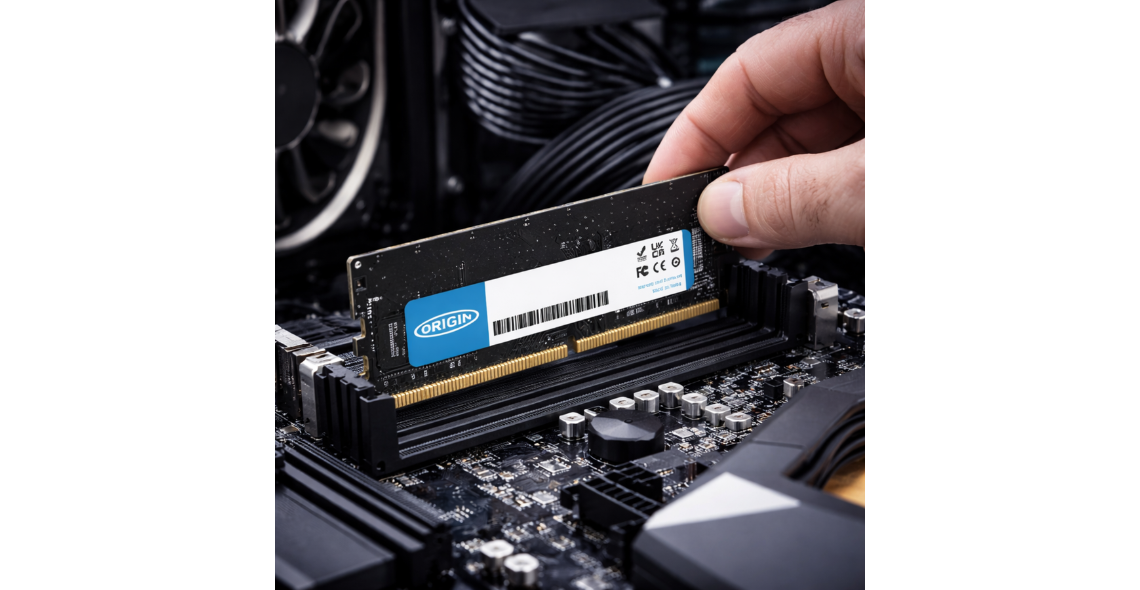
Selecting appropriate memory components represents one of the most critical decisions when building or upgrading server infrastructure. The performance, reliability, and scalability of enterprise systems depend heavily upon properly specified and configured memory modules. Understanding the nuances of server-grade memory helps organisations avoid costly mistakes whilst maximising return on investment in their IT infrastructure.
Understanding Server Memory Architecture
Server memory differs fundamentally from desktop or laptop RAM in several crucial ways. These differences stem from the demanding requirements of enterprise environments where uptime, data integrity, and consistent performance are paramount.
Error-Correcting Code (ECC) memory forms the foundation of reliable server operation. This technology detects and corrects single-bit errors automatically, preventing data corruption and system crashes. Without ECC protection, servers handling critical workloads face increased risk of silent data corruption that can compromise entire databases or applications.
Key Server Memory Technologies
Modern servers utilise several distinct memory technologies, each designed for specific performance and capacity requirements:
Registered DIMMs (RDIMMs) include a register between DRAM modules and the system memory controller, reducing electrical load
Load-Reduced DIMMs (LRDIMMs) employ isolation buffers that enable higher memory densities per channel
Unbuffered DIMMs (UDIMMs) provide direct communication with memory controllers, typically used in entry-level servers
Non-Volatile DIMMs (NVDIMMs) combine traditional RAM speed with persistent storage capabilities
The choice of server memory type significantly impacts both maximum system capacity and overall performance characteristics.
Capacity Planning for Server Memory
Determining the appropriate amount of ram for server configurations requires careful analysis of workload characteristics, application requirements, and future growth projections. Insufficient memory allocation leads to excessive paging, dramatically degrading performance, whilst over-provisioning wastes capital and operational resources.
Database servers typically demand substantial memory allocations. SQL Server instances, for example, benefit from specific memory configuration recommendations that balance buffer pool requirements with operating system needs. A properly configured database server might allocate 80-90% of physical memory to the database engine, reserving the remainder for system operations.
Application-Specific Requirements
Different server roles demand distinct memory profiles:
Virtualisation hosts require substantial overhead for hypervisor operations plus allocations for each virtual machine
Web servers generally need modest memory for caching frequently accessed content and managing concurrent connections
Analytics platforms benefit from maximum available memory to process large datasets in-memory
File servers utilise memory primarily for caching frequently accessed files and metadata operations
Modern applications increasingly rely on in-memory processing to achieve acceptable performance levels. Traditional disk-based operations simply cannot deliver the response times users expect from contemporary software systems.
Performance Optimisation Strategies
Beyond selecting appropriate memory modules, organisations must implement proper configuration and monitoring practices to extract maximum value from their investments in ram for server infrastructure.
Memory speed and timing parameters significantly influence system performance. Server memory operates at various frequencies, typically ranging from 2400MHz to 4800MHz in current-generation systems. Higher frequencies generally deliver improved performance, though the actual benefit depends on specific workload characteristics.
Monitoring and Management
Effective memory management begins with comprehensive monitoring. System administrators should track several key metrics:
Memory utilisation percentages across different time periods to identify trends
Page file usage indicating insufficient physical memory allocations
Memory errors detected and corrected by ECC mechanisms
Application-specific memory consumption patterns revealing potential optimisation opportunities
Optimising server RAM usage involves both reactive responses to current bottlenecks and proactive capacity planning for future requirements. Organisations that implement systematic monitoring practices identify memory constraints before they impact production workloads.
Memory Selection Criteria
Choosing appropriate ram for server deployments requires evaluating multiple technical specifications beyond simple capacity numbers. Compatibility, reliability, and vendor support all play crucial roles in ensuring successful implementations.
Qualification and validation processes differ substantially between consumer and enterprise memory markets. Server memory undergoes extensive testing to ensure compatibility with specific motherboard and processor combinations. This validation reduces deployment risks but requires purchasers to verify compatibility before ordering.
Quality and Reliability Factors
Several factors distinguish premium server memory from budget alternatives:
Thermal sensors enabling proactive temperature monitoring
Higher-grade components selected for extended operational lifespans
Comprehensive testing protocols covering stress, thermal, and compatibility scenarios
Extended warranty coverage reflecting manufacturer confidence in product durability
Server performance depends significantly on RAM choice, making careful vendor selection essential for long-term success. Established manufacturers with proven track records in enterprise markets typically deliver superior reliability compared to unknown brands offering seemingly attractive pricing.
Security Considerations
Memory security has emerged as a critical concern in modern data centre environments. Various attack vectors target system memory to compromise confidential information or destabilise systems.
Rowhammer attacks exploit physical characteristics of DRAM cells to flip bits in adjacent memory rows. Research into preventing Rowhammer exploits demonstrates the sophisticated techniques attackers employ and the countermeasures organisations can implement. Modern server platforms incorporate hardware-level protections, but proper memory selection remains important for security-conscious deployments.
Memory Encryption Technologies
Advanced server platforms now offer memory encryption capabilities that protect data whilst it resides in RAM. These technologies address scenarios where physical access to servers might enable memory extraction attacks. Intel's Total Memory Encryption (TME) and AMD's Secure Memory Encryption (SME) represent two leading implementations.
Encrypted memory does introduce some performance overhead, typically ranging from 2-5% depending on workload characteristics. Organisations handling highly sensitive information generally find this trade-off acceptable given the security benefits provided.
Scaling and Upgrade Strategies
Server memory requirements rarely remain static over system lifespans. Proactive server management practices include planning for future memory expansion from initial deployment onwards.
Memory population strategies impact both current performance and future expandability. Servers typically support multiple memory channels, with optimal performance achieved when channels are populated equally. A server with six memory channels performs best with memory installed in multiples of six, such as 6, 12, or 18 modules.
Future-Proofing Considerations
When specifying ram for server systems with anticipated growth trajectories, several strategies maximise long-term value:
Evaluate total DIMM slot count against current and projected memory requirements
Consider higher-capacity modules to preserve expansion slots for future growth
Match memory speed to processor capabilities ensuring headroom for processor upgrades
Document configuration details facilitating future expansion projects
Budget for matched sets maintaining performance consistency across upgrade cycles
Comparing Leading Server Memory Options
The market offers numerous server memory products spanning different performance tiers, capacity points, and price ranges. Reviews of top server RAM options help organisations navigate the complex landscape of available products.
Entry-level configurations typically utilise 16GB or 32GB modules at moderate speeds, providing adequate performance for small business servers, development environments, and non-critical applications. These configurations balance initial costs against acceptable performance levels for less demanding workloads.
Mid-range deployments increasingly standardise on 32GB or 64GB modules running at higher speeds. These specifications suit general-purpose virtualisation hosts, departmental database servers, and web application platforms handling moderate transaction volumes.
Enterprise-class implementations deploy 64GB, 128GB, or larger modules to maximise density within available DIMM slots. High-capacity configurations support large-scale virtualisation clusters, in-memory databases, and analytics platforms processing substantial datasets.
Vendor Comparison Framework
When evaluating different memory vendors and specific products, organisations should assess multiple dimensions:
Technical specifications including speed, capacity, and error correction capabilities
Compatibility with existing infrastructure components
Warranty terms and support responsiveness
Price-performance ratios across different capacity points
Availability and lead times for replacement modules
The most expensive option rarely represents the best value, whilst the cheapest alternative often proves costly through reduced reliability or compatibility issues. Thorough evaluation identifies optimal solutions balancing all relevant factors.
Installation and Configuration Best Practices
Proper installation of ram for server systems requires attention to mechanical, electrical, and configuration details that casual users might overlook. Following manufacturer guidelines prevents both immediate failures and subtle issues that emerge under load.
Physical installation procedures demand careful handling of sensitive electronic components. Static electricity discharge can damage memory modules, whilst improper seating in sockets causes intermittent errors or complete system failures. Professional installation in controlled environments minimises these risks.
BIOS and Firmware Settings
Memory configuration extends beyond physical installation to include numerous BIOS settings that influence performance and stability:
Memory frequency settings determining operational speed
Timing parameters controlling access latencies
Power management features balancing performance against energy consumption
ECC configuration enabling error detection and correction
Memory testing options validating proper operation
Default BIOS settings generally provide conservative configurations prioritising stability over maximum performance. Experienced administrators may adjust these parameters to extract additional performance, though such optimisation requires thorough testing to ensure stability under production workloads.
Maintenance and Lifecycle Management
Server memory requires ongoing attention throughout its operational lifecycle. Even high-quality modules eventually develop faults, whilst changing workload requirements may necessitate capacity adjustments.
Regular testing protocols identify developing issues before they cause production outages. Comprehensive memory tests run during maintenance windows detect subtle errors that might not trigger immediate system failures. These preventive measures prove particularly valuable in mission-critical environments where unexpected downtime carries substantial costs.
Memory refresh cycles typically align with broader server replacement schedules, usually spanning three to five years for most organisations. However, high-utilisation environments or rapidly evolving workload requirements may justify more frequent upgrades to maintain optimal performance levels.
Selecting and managing appropriate RAM for server infrastructure requires balancing technical specifications, performance requirements, security concerns, and budget constraints. Success demands understanding the fundamental differences between server and desktop memory whilst implementing proper monitoring and maintenance practices.
Origin Storage provides comprehensive memory solutions specifically designed for server environments, including ECC-protected modules, high-capacity configurations, and expert guidance for capacity planning. Our technology specialists help organisations identify optimal memory configurations that deliver reliable performance whilst supporting future growth requirements.


Comments
There are currently no comments, be the first to comment.